
Victron GlobalLink 520 or 530: which one works in the USA?
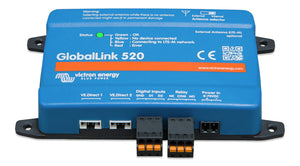
The two boxes match on the outside and do the same job. Each sends one or two VE.Direct devices, plus up to ten Bluetooth Victron devices, to the free VRM portal. Each ships with a prepaid SIM that covers five years. Only the modem is different, and Victron's datasheet says that decides the country:
| GlobalLink 520 | GlobalLink 530 | |
|---|---|---|
| Cellular | LTE-M (Cat M1), SIMCom SIM7070G | LTE Cat 1 + 2G fallback, SIMCom A7672G |
| Victron recommends it for | the United States | most other countries, incl. Canada |
| US use | yes | "not authorised for use in the US" |
So a US-based RV, boat or storage-lot trailer gets the 520. A Canadian rig that never crosses the border could use the 530. If it travels in both countries, the 520 is the one cleared for the US. Victron lists Canada among the LTE-M countries for the 520.
What to check before ordering the 520
- LTE-M coverage where the rig sits. LTE-M isn't the same as phone 4G. The manual links to the 1nce coverage map and a Victron Community list of carriers already carrying GlobalLinks. Check the storage lot, not just your house.
- Signal at the mounting spot. Victron's table says below about -85 dBm, "performance will drop drastically", and updates start missing their 15-minute slots. You can see the RSSI in VRM.
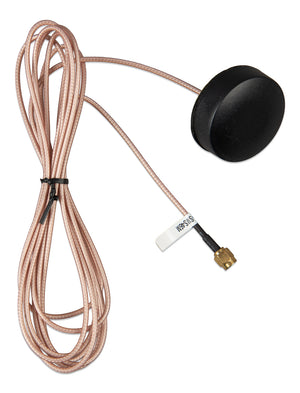
- Metal around it. The unit isn't rated for outdoor use. In a steel van or a metal battery box, add the LTE-M puck or wall-mount antenna and slide the antenna switch toward the SMA connector. Never set that switch to external without an antenna attached. Victron says doing that can permanently damage the unit.
After year five, or with your own SIM
The built-in SIM only works in that unit and has a small data allowance. Victron says it will offer paid extensions in VRM, and until then it keeps the SIMs running. You can also fit your own SIM. Make sure the plan supports LTE-M (Cat M1). Victron puts usage at roughly 1 to 2 MB a week.
Shop the full Victron Energy range at RV Parts Giant.
What you need


Want the full walkthrough? Read the complete guide.