
Which Victron inverters work with the Phoenix Inverter Control remote panel?
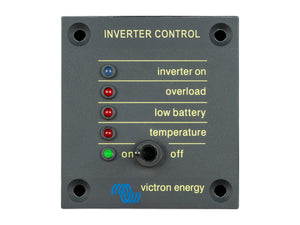
The panel gives you an on/off switch and status LEDs inside the living area instead of at the inverter. It only talks to inverters that have the UTP remote socket, which rules out more of the current range than people expect.
The compatible list
Victron names these models for the panel: 12/1200, 12/1600, 12/2000, 12/3000, 12/5000, 24/1200, 24/1600, 24/2000, 24/3000, 24/5000, 48/3000 and 48/5000. These are the Phoenix inverters built around VE.Bus. From that list we stock the Phoenix Inverter 12/3000 and 24/3000 120V, which have the VE.Bus port the panel needs.
The ones it will not drive
The VE.Direct Phoenix inverters, 250 VA through 1600 VA with the NEMA 5-15R outlet, do not have the UTP socket. That includes the 12/1200 and 12/1600 VE.Direct units, even though the same numbers appear on the compatible list for the VE.Bus versions. Check the port on the inverter: an RJ45 VE.Bus socket means the panel works; a small VE.Direct socket means it does not, and remote control on those models is done from the VictronConnect app over the optional Bluetooth dongle.
Using it with a MultiPlus
A MultiPlus is an inverter, charger and transfer switch in one. Connected to the Phoenix Inverter Control, it behaves as an inverter with an automatic transfer switch and no charger function. That suits an RV where another charger (solar, a DC-DC charger) does the charging and you only want shore power passed through with the inverter as backup. If you want charger control too, the Digital Multi Control is the panel for a MultiPlus.
In a lithium system
With a VE.Bus BMS V2 managing Victron Smart lithium batteries, the panel plugs into the BMS's Remote panel port in place of a Digital Multi Control, provided the inverter is a Phoenix VE.Bus model. The BMS still shuts the inverter down on a low cell; the panel just gives you the switch and the lights.
Installing it
- Switch the inverter off before plugging the panel in.
- Mount it where you see it from the living area and route the RJ45 cable away from the battery cables.
- The LEDs dim automatically at night, so it can live in a bedroom.
- If nothing lights up, confirm the model against the list above before suspecting the panel.
The panel and the 3000 VA Phoenix inverters ship from our Upland, California warehouse.
Shop Victron Phoenix inverters, or the full Victron Energy range at RV Parts Giant.
What you need


Want the full walkthrough? Read the complete guide.